The Museum of Hidden Treasures
IWATO
Hope was hidden behind a door of stone.
Press the mirror to open the rock door, then watch the scroll beneath the film unroll. Each seal jumps to a chapter.
The case, labelled
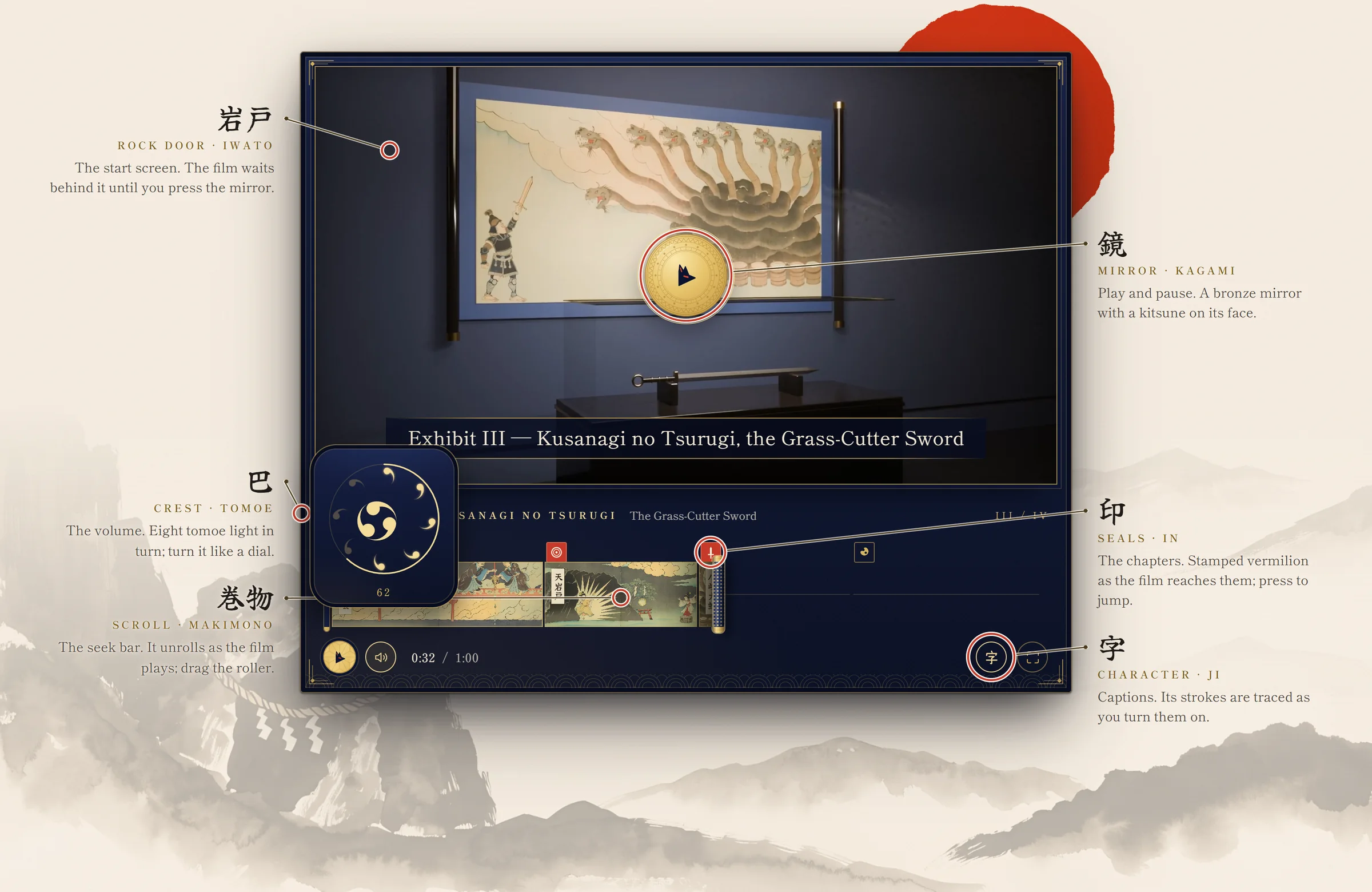
Every part of the case is a control
Like any exhibit in the museum it belongs to, the player has its labels: each part of the case is one of its controls.
The collection
Four treasures, one scroll
The film walks the museum's night hall. Each exhibit is one chapter, and one painting on the handscroll.
Inside the case
How the player works
Recorded from the player above. The clips play while they are on screen.
-
The handscroll
The seek bar is an emakimono. Until the film reaches a scene it stays wound on the roller, which turns as the paper comes off it and grows thinner as the scroll runs out; each painting lights up as it leaves the roll. Drag the roller, or focus it and use the arrow keys.
-
The seals
One seal per chapter, carved in gold until the film reaches it, then stamped in vermilion. Press a seal to jump to its chapter; the nameplate above names it.
-
The rock door
Before the film starts, it waits behind the rock door of Ama-no-Iwato, roped with a shimenawa. The play button is the bronze mirror that drew the sun goddess out: press it and light breaks through the seam, the stone grinds apart, and a fox spirit runs around the mirror. When the film ends, the door closes again.
-
Fox-fire
Every press answers with kitsunebi, pale wisps of fox-fire. They rise when you press, and settle when the film pauses.
-
The crest
Volume is a crest of nine tomoe. The eight around the rim light in turn as the volume rises, each with a ring of light and a wisp of fox-fire, and the centre turns like a dial. Press a tomoe to jump to its level, drag around the ring like a knob, or use the wheel or the arrow keys. Press the centre to mute: the crest goes to ash.
-
For everyone
The captions button is 字 (ji, as in 字幕, subtitles): turn captions on and its strokes are traced in order like a brush. Captions sit on a plaque between gold hairlines, with sounds set apart in 〔brackets〕. Every control works from the keyboard with a gold ensō focus ring; touch targets are 44 px; the controls sit on the case, never over the film. With reduced motion on, every animation stops.